How to Set Up the AdBlock Detector
Foxiz can notice the common ad blocking extensions and put a popup in front of the page until the reader whitelists your site. Nothing happens until you pick a detection method: the setting is set to - Disable - by default.
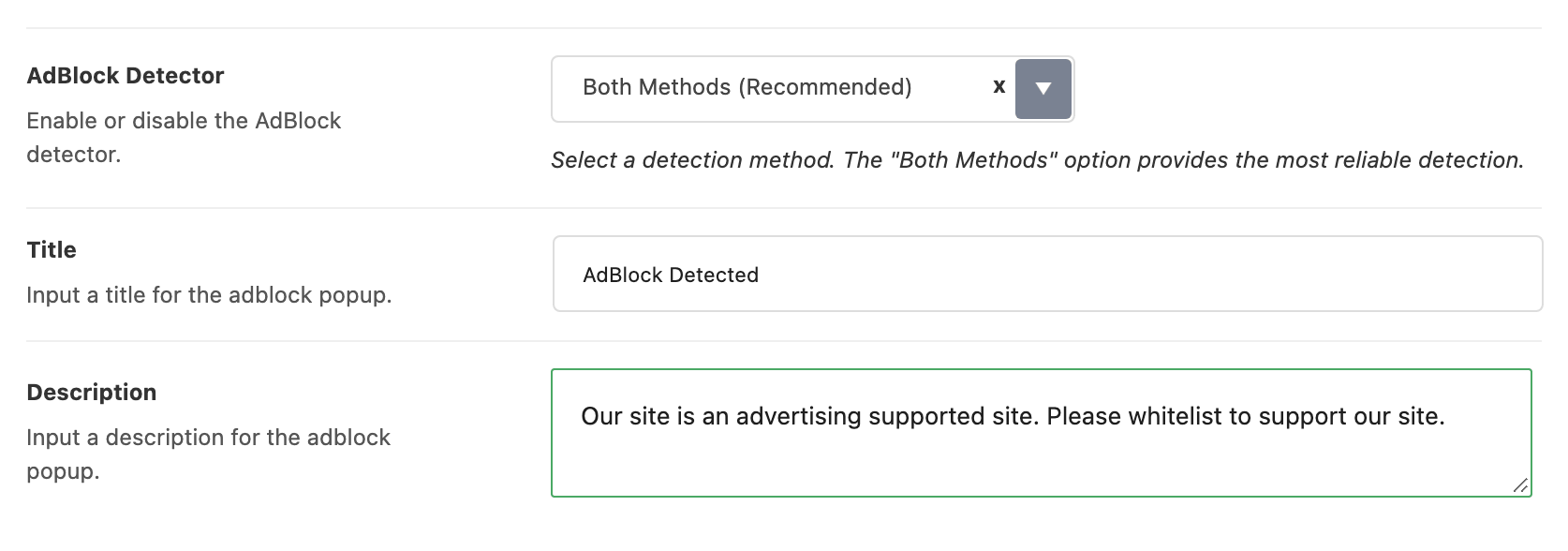
- Navigate to Theme Options > AdBlock Detector.
- Set AdBlock Detector to Bait Element Method, External Script Detection or Both Methods (Recommended). The next section says which to choose.
- Two fields appear underneath, and they are the popup's own words. Title arrives holding "AdBlock Detected" and Description holds "Our site is an advertising supported site. Please whitelist to support our site." Replace both with something in your own voice.
- Save your changes, then load the site in a browser that has a blocker running. Detection starts a second and a half after the page has loaded, so give it a moment before deciding it did not work.
Which detection method to choose
The two methods look for different things, and they are wrong in different ways.
Bait Element Method drops a small hidden element carrying the class names blockers look for, waits a tenth of a second, and checks whether the element was hidden or removed. That catches the filter list extensions, which is most of what people install. It makes no network request and decides almost immediately.
External Script Detection asks Google's server for the AdSense script file and counts the reader as blocking only when that request is refused. That catches blocking the bait cannot see, where the request never leaves the machine: a DNS filter, a hosts file, a locked down office network, a browser with strict shields. A request that is merely slow does not count. After five seconds the check gives up and lets the reader through, so a slow connection to Google never puts the popup up. The file is only asked for, never run, so this method does not load AdSense on your pages.
Both Methods (Recommended) runs the bait first and only falls back to the script test when the bait came back clean, so most blocked readers are caught in that first tenth of a second and only the quiet cases wait. It finds the most, and it is the option the panel recommends.
If your readers are mostly on home connections, start with Both Methods (Recommended). If many of your readers sit on office or school networks that block ad servers for everyone, which they cannot switch off, and you would rather miss a blocker than lock out a paying reader, use Bait Element Method on its own.
What a blocked reader sees
A popup opens in the middle of the screen with a stop-hand icon, your Title, your Description and a single button reading "Okay, I'll Whitelist".

It is a wall, not a notice. There is no close button, the Escape key does nothing, clicking the background does nothing, and the right click menu is switched off while the popup is up. The button reloads the page the reader was on, so if the extension is still running they arrive straight back at the popup.
That is what makes the Description worth writing carefully. It is the only instruction the reader gets, and the only way past it is to turn their blocker off for your domain and reload, so say that in as many words.
Clearing a field removes that line from the popup rather than leaving a gap: empty Title and the heading is not printed, empty Description and the paragraph is not printed. Clear both and you have published an icon and a button with no explanation, which is the one combination worth avoiding.
Two audiences never meet the popup. Search engine crawlers are recognised by their browser identification and skipped, so switching detection on does not put a wall in front of Google. AMP pages do not carry it either.
Detection covers the whole site and has no per post switch: it is every page or none. Leave the setting on - Disable - if you would rather not hold any page back.
Did this answer your question?