How to Manage Settings for Individual Post Types
Every post of a custom post type has a Single Post Type Settings box under its editor. Use it when one post should look or behave differently from the rest of its type: its layout, sidebar, table of contents, ads and more.
To get started, follow the steps below:
-
Navigate to Dashboard > Custom Post > All Custom Post, meaning the admin menu your post type created. The menu name is whatever you gave the post type; Foxiz adds nothing to the sidebar for it.

-
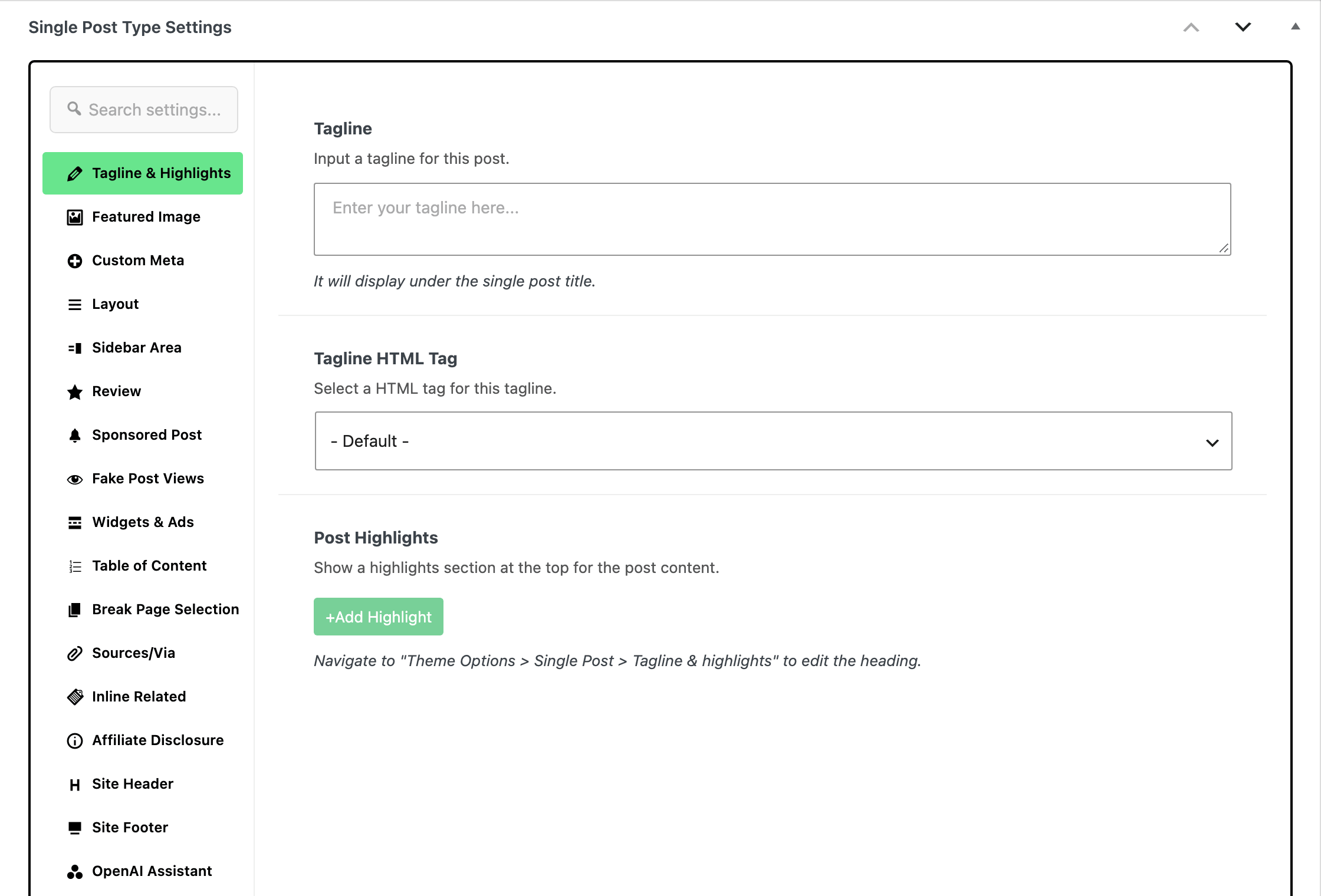
Hover the post you want to change and click Edit under its title. In the editor, click the Meta Boxes bar at the bottom to open it, and find the Single Post Type Settings box. The box sits below the editor content, not in the right hand column.
-
Here, you can find specific settings for that particular custom post type. The box has sixteen tabs down its left side:
- Tagline & Highlights: a Tagline under the title, its Tagline HTML Tag, and a repeatable list of Post Highlights.
- Featured Image: Featured Crop Size, Caption Text and Attribution for this post.
- Custom Meta: a Custom Meta Value for the entry meta line.
- Layout: Standard Layout and a Template Shortcode for a Ruby Template. Both override Theme Options > Post Types for this post.
- Sidebar Area: Sidebar Position and Assign a Sidebar, which the tab's own notice says take priority over Theme Options > Single Post > Sidebar Area. Left on - Default -, Assign a Sidebar follows the post type's own Assign a Sidebar in Theme Options > Post Types first, and Sidebar Area only when that is on - Default - too.
- Review: Post Review, Review Type, Criteria Data, Advantages, Disadvantages, the price offer fields and the rest of the review box.
- Sponsored Post: the sponsor switch, URL, name and both logos.
- Fake Post Views: the view count input.
- Widgets & Ads: switches for this post alone.
- Top Site Advert and Header Advertising Widget Section
- Header Alert Bar
- Top Content - Widgets Area and Bottom Content - Widgets Area
- Inline Ad 1, Inline Ad 2 and Inline Ad 3
- Auto Ads
- Table of Content: Table of Contents, its Layout and a Display Position.
- Break Page Selection: a Headings Table of Input Heading rows for splitting the post across pages.
- Sources/Via: Post Sources and Post Via, each a repeatable name and URL.
- Inline Related: Inline Related Posts and Display Positions, the paragraph counts after which the related box is inserted.
- Affiliate Disclosure: a Disclosure Section switch for this post.
- Site Header: a Header Layout for this post only.
- Site Footer: a Template Shortcode for a footer built as a Ruby Template.
Almost every field in the box starts on a default meaning "use the Theme Options value", so an untouched tab changes nothing. Set only what you want to differ for this post.
-
Open a tab and change only the fields this post needs. Then click Publish, or Save on a post that is already published.
If the box is not on the screen, the post type is the reason.
Foxiz registers Single Post Type Settings only for post types that are public, and never for these, which have their own boxes:
post,pageandattachmentpodcast- WooCommerce products
- bbPress forums and topics
- Elementor's landing pages and library
- Ruby Templates
An ACF post type whose name starts with acf- is excluded too.
Did this answer your question?