The Foxiz Custom Field Meta Block in Elementor
Foxiz - Custom Field Meta prints the value of one custom field belonging to the post being viewed, with an optional icon before it and an optional label beside it. It sits in the Foxiz - Element category and searching the panel for meta finds it.
It is built for a single post template, where the post is whichever one the reader opened. Drop it into a template built with the single builder and one block serves every post, each showing its own value. The steps for building that template are in how to structure a single post layout using a single template.
It works on an ordinary Elementor page too, where it reads that page's own custom fields.
Which field it reads
Whatever you type into Custom Field ID/name, exactly. The block offers no dropdown and no browse button: it asks the post for a custom field of that name and prints what comes back.
So the name has to match what wrote the field, character for character:
- A field added by a plugin uses that plugin's own name for it. Copy it from the plugin's field settings rather than guessing from the label a reader sees.
- A field you added yourself in the WordPress Custom Fields panel uses the name you typed there. The block editor hides that panel until you switch it on: open Options (the three dots at the top right of the editor) > Preferences > General, and turn on Custom fields under Advanced.
- Leading and trailing spaces are forgiven, so a name pasted with a stray space still resolves. Nothing else is.
The value is printed as it is stored, and basic inline markup inside it survives, so a field holding bold text or a link keeps them.
What happens when the post has no value there
Nothing is drawn. Not an empty space with an icon in it, not the label on its own: the whole block is absent from the page.
That is the behaviour you want in a single post template, because it means one template serves posts that have the field and posts that do not, with no gap left behind on the ones that do not. It is also why a block that looks fine in the editor can be missing from half your posts, and that is not a fault to chase.
Three cases count as no value:
- The post has never had that field.
- The field exists and is an empty string.
- The field holds a zero. A field that legitimately stores 0, a count or a price, will not print it, so store such a value as text if you need the zero on the page.
Inside the Elementor editor the block always shows the words "dynamic meta value" instead of a real value, whatever you typed in Custom Field ID/name and whether or not any post has that field. So the editor tells you where the block sits and how it is styled, and nothing about whether the name is right. Check a real post on the front end before you call it done.
Content tab
Everything is in the one Custom Field Meta section.
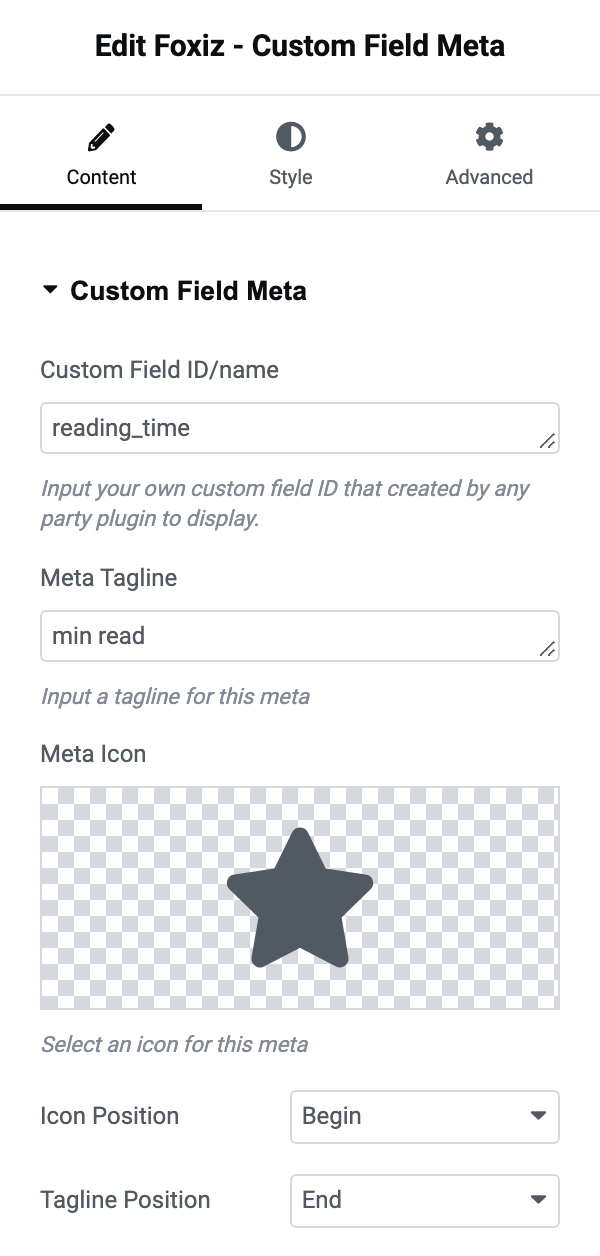
- Custom Field ID/name is the field name, empty on arrival. Empty is also the one thing that stops the block dead: with nothing here, nothing is drawn on any post.
- Meta Tagline is a short label printed beside the value, empty on arrival. This is where the word a reader needs goes, because the field name itself is never shown: type "Reading time" here and the value beside it reads as something. Leave it empty and only the value is printed.
- Meta Icon is Elementor's icon picker and it arrives holding a solid star. Clear it and no icon is drawn.
- Icon Position offers Begin and End. Its default is Begin, which puts the icon first.
- Tagline Position offers Begin and End. Its default is End, which puts the label after the value.
So out of the box the line reads icon, value, label: a star, then the value, then whatever you typed as the tagline. Set Tagline Position to Begin for the more usual reading, "Reading time 6 min".
Style tab
for Meta
These four apply to the line as a whole, the value included.
- Meta Font is the typography group for the whole line.
- Meta Color and Dark Mode - Meta Color set the text colour in each mode. Both are empty by default, which inherits the colour your theme uses for post meta.
- Spacing is the gap between the icon, the value and the label, in pixels, per device, blank on arrival.
for Tagline
One control, Tagline Font, so the label can be a different size or weight from the value beside it.
for Icon
- Icon Font Size is the icon's size in pixels, per device, blank on arrival.
- Icon Color and Dark Mode - Icon Color colour the icon independently of the text, which is how you get a coloured glyph beside grey meta. Both are empty by default.
The tagline takes Meta Color along with the value, and carries no colour control of its own.
When the block draws nothing
In order of how often it is the answer:
- The post has no value in that field. Open a post you know has one.
- The name in Custom Field ID/name does not match the field's real name. The editor cannot tell you this, because it shows a placeholder value either way.
- Custom Field ID/name is empty.
- The value stored is a zero.
Did this answer your question?