Elementor Builder
What is Elementor?
Foxiz works best with Elementor, and every Foxiz layout can be built with it.
Elementor is a page builder: you lay a page out by dragging blocks onto a canvas instead of typing into the WordPress editor. Foxiz's own blocks arrive as Elementor widgets, grouped into six categories in the builder's panel:
- Foxiz - Flex
- Foxiz - Standard
- Foxiz - Element
- Foxiz Header
- Foxiz Podcast
- Foxiz Single

None of them appear until Elementor is active, which is why this is the first thing to install.
You need the free Elementor plugin, installed and active: https://wordpress.org/plugins/elementor/
Foxiz can do that for you. Elementor is the first entry in Essential Plugins on Dashboard > Foxiz, with an Install button beside it, so you never have to leave the admin.
Creating a Page with Elementor.
To create a page or post with this plugin, follow steps below:
-
Navigate to Pages > Add Page
-
Add the title of the page, ie: Home
-
Click on the "Edit with Elementor" button to switch to the builder panel.

-
The website will redirect to another URL and the panel will appear on the page.
Important Steps: setting up the page exactly as the below:
These two values are what make an Elementor page line up with the header, the footer and every page the theme builds itself. Foxiz's own container is 1280px wide with 20px of padding on each edge, and Elementor's default is 1140px, so without this step an Elementor homepage sits visibly narrower than the header above it.
-
Then click the Elementor Logo at the far left of the bar across the top of the editor. Older Elementor had it as a menu icon at the top of the left panel; it opens the same menu.

-
Select the "Site Settings" option.
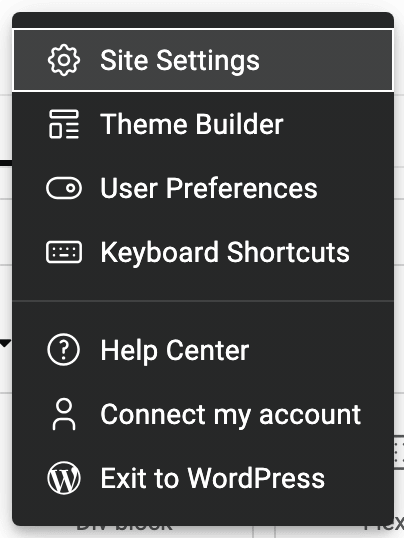
It is the first item in that menu, and Ctrl + K on Windows or Command + K on macOS opens it directly.
-
Select the "Layout" option.
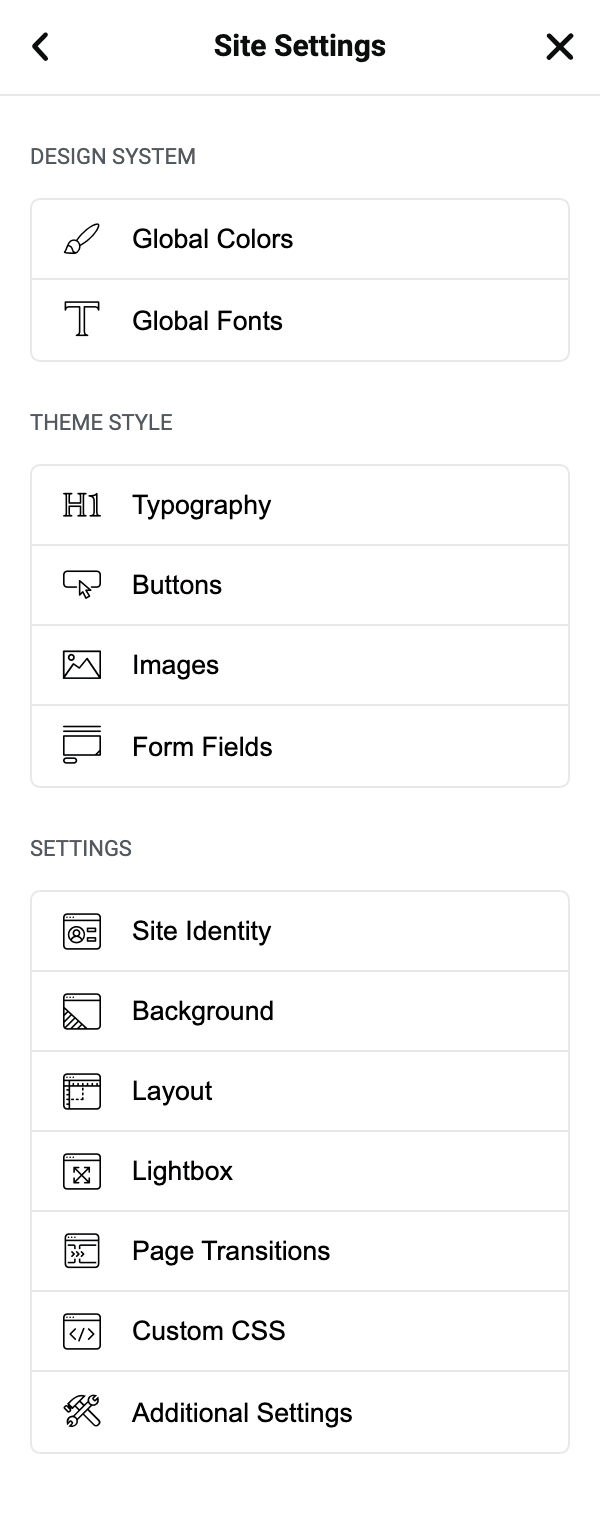
Both fields are in its Layout Settings section.
-
Under the "Content Width" input this value 1280 and the "Widgets Space" input this value 20
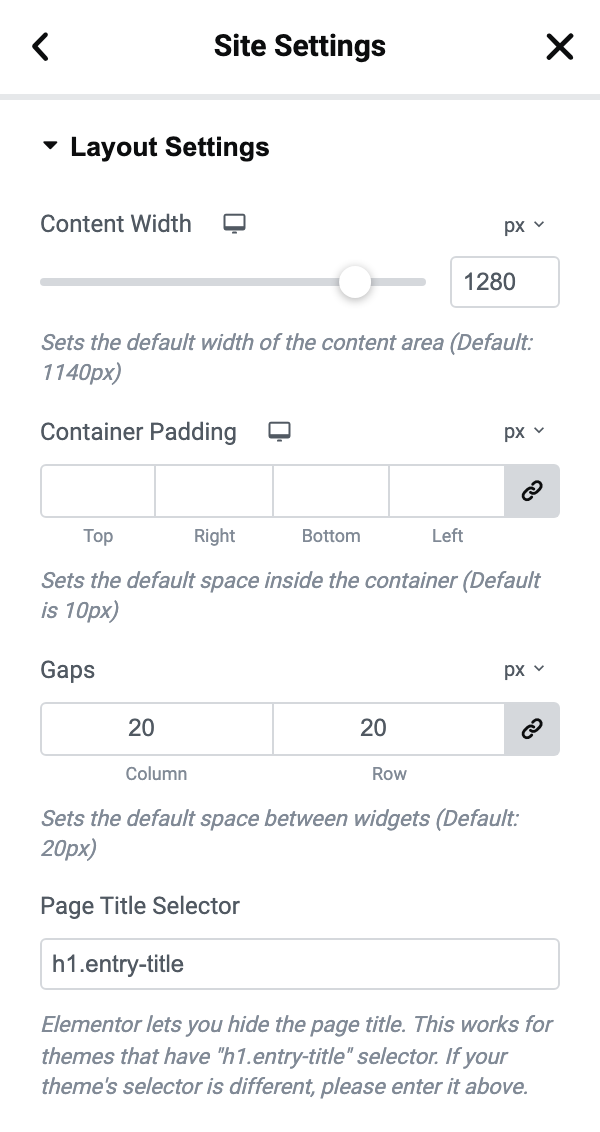
Content Width is a slider that also takes a typed number, between 300 and 1500 in steps of 10, and it starts at 1140.
Widgets Space is named Gaps on newer Elementor, where it takes a row value and a column value rather than one number. Both already start at 20, so there is usually nothing to change here.
note1280 is the width to match because that is what the theme uses. If you change Theme Options > Theme Design > Container Width the rest of the site follows, but Elementor pages and Ruby Templates do not: the panel says so itself. Change this Elementor value to the same number whenever you change that one.
-
Click "Save Changes" to save your changes.
That button is the Site Settings panel's own, at the bottom of the panel, and it stays greyed out until you have actually changed something.
These are site wide settings rather than page settings, so you do this once and every Elementor page on the site inherits it.
-
After that, add your containers and blocks: How to Build your Homepage with Elementor Builder? walks it step by step.
Elementor's YouTube channel: https://www.youtube.com/channel/UCt9kG_EDX8zwGSC1-ycJJVA/videos
Every Foxiz block, control by control
These cover the blocks themselves: where each one lives in the panel, every control it offers and what its default is.
- The Foxiz Archive Title, Description and Featured Image Blocks in Elementor
- The Foxiz Authors List 2 Block in Elementor
- The Foxiz Call to Action Block in Elementor
- The Foxiz Custom Field Meta Block in Elementor
- The Foxiz Gallery Blocks in Elementor
- The Foxiz Heading Block in Elementor
- The Foxiz Image Block in Elementor
- The Foxiz Rotating Words Block in Elementor
- The Foxiz Search Taxonomies Block in Elementor
- The Foxiz Sidebar Menu Block in Elementor
- The Foxiz Social Follower Block in Elementor
- The Foxiz Tax-based Accordion Posts Block in Elementor
- The Foxiz Taxonomies List Blocks in Elementor
- The Foxiz Weather Block in Elementor
Did this answer your question?