The Foxiz Element Blocks in Elementor
The element blocks are everything on a page that is not a list of posts: headings, images, author and category cards, search boxes, forms, adverts, newsletters and more. In the Elementor panel they sit in the Foxiz - Element category.
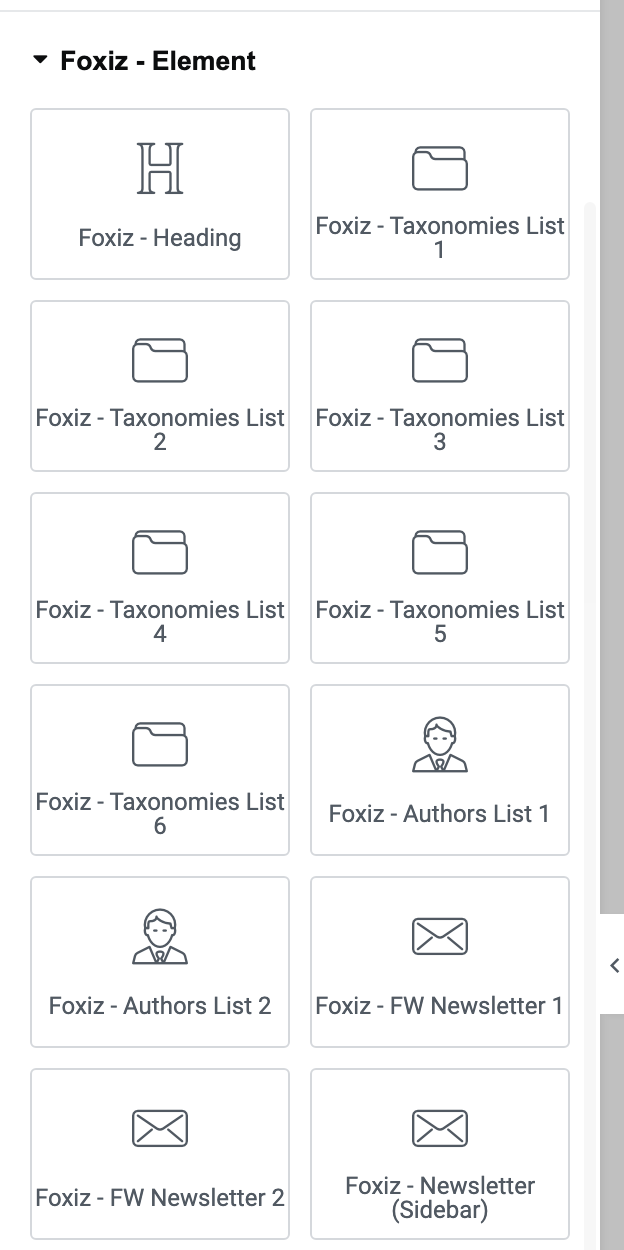
To find one, type part of its name into the search box at the top of the panel, for example weather or gallery. Most blocks also answer to a few extra words, such as advert for the ad blocks.
Ruby Templates are built with the same Elementor editor, so every block on this page also works inside a template: a header, a footer, a popup or a single post layout.
Four blocks in the same category only fill in inside a builder template, because they read the archive or post they are shown on. They are in Template Blocks:
- Foxiz - Archive Title
- Foxiz - Archive Description
- Foxiz - Taxonomy Featured Image
- Foxiz - Custom Field Meta
Headings and text
- Foxiz - Call to Action: an image, a heading, a paragraph and up to two buttons. Use it to promote one thing, like a product, an event or a sign up. The Call to Action block.
- Foxiz - Heading: the section title you put above a grid or a list, with an optional tagline and a choice of heading styles. On a template it can print the archive's own name. The Heading block.
- Foxiz - Rotating Words: one line of text in which a single word keeps changing. A new block reads "THE BEST NEWS WORDPRESS THEME.", with NEWS turning into MAGAZINE, then BLOG. Good for a hero section. The Rotating Words block.
Images and galleries
- Foxiz - Image: a single picture, with a second picture for readers in dark mode. Use it for a logo or a diagram that has to stay readable in both modes. The Image block.
- Foxiz - Lightbox Gallery: a grid of pictures that open full size in a popup when clicked. The gallery blocks.
- Foxiz - Simple Gallery: a plain grid of pictures, each with its own title, text and link. Nothing pops up; a click follows the link. The gallery blocks.
Authors, categories and tags
The six Taxonomies List blocks show one card per category, tag or custom taxonomy term, with its featured image, name and post count. They can also show the terms the visitor follows. All six are covered in The Taxonomies List blocks.
- Foxiz - Authors List 1: a card per writer you pick, with the name and article count at the top and the avatar to the side. The Authors List 2 block covers both author lists.
- Foxiz - Authors List 2: the same cards in another order: avatar, job title, name, biography and an optional follow button. Use either for a team or contributors page. The Authors List 2 block.
- Foxiz - Tax-based Accordion Posts: a stack of category or tag names; a click opens that term's posts as a list of links. Use it for a "browse everything" page or a sitemap. The Tax-based Accordion Posts block.
- Foxiz - Taxonomies List 1: a card with the image, then the name and post count, with the follow button beside them.
- Foxiz - Taxonomies List 2: the name and post count printed over the image, on a colour gradient.
- Foxiz - Taxonomies List 3: the same overlay card, with the term's description under the name.
- Foxiz - Taxonomies List 4: the image on top, the name and count below it.
- Foxiz - Taxonomies List 5: an image you size by width, with the follow button placed on the image.
- Foxiz - Taxonomies List 6: compact rows, a small image beside the name and count. It fits a sidebar or a narrow column.
Search and navigation
- Foxiz - Quick Links: a short row of links after a label, for example "Quick Links: Technology, Business, Science". Add the links by hand, or let the block collect the top terms of the taxonomies you name, categories and tags by default. How to display top taxonomies with Quick Links.
- Foxiz - Search Posts: the site search, as an icon that opens a search popup or as a visible search form, with optional live results while the visitor types. It is the search block for a header template. How to create header templates.
- Foxiz - Search Taxonomies: a search box that finds categories and tags, not posts. Matching terms appear in a panel under the field. The Search Taxonomies block.
- Foxiz - Sidebar Menu: one of your WordPress menus, shown as a vertical or horizontal list. Use it to put a menu in a footer column, a sidebar or a landing page. The Sidebar Menu block.
Social and newsletter
The three newsletter blocks show your sign up form from a form plugin shortcode, [mc4wp_form] by default. Set the form up first with MC4WP Form Structure.
- Foxiz - FW Newsletter 1: a full width sign up band with a heading, a description, an optional image and the form.
- Foxiz - FW Newsletter 2: the same full width band in a second design.
- Foxiz - Newsletter (Sidebar): the sign up box for a narrow column or a sidebar.
- Foxiz - Social Follower: a grid of social tiles, each with an icon, a follower number you type in, and a link to your profile. The Social Follower block.
Adverts and promotions
All three are explained in The Foxiz Ad Blocks in Elementor.
- Foxiz - Ad Image: a banner image that links to your advertiser, with an optional second image for dark mode.
- Foxiz - Ad Script: an AdSense unit or any other ad network code.
- Foxiz - Sidebar Banner: your own promotion, a title and text over a background image with a button.
Login, registration and membership
- Foxiz - Login Form: a login form for your own login page. After you publish it, set that page in Theme Options > Login > Custom Login Page URL. Guide to creating a login page.
- Foxiz - Plan Subscription: a pricing box with a title, price, feature list and a payment or free sign up button. Use one per plan. Setup your plans.
- Foxiz - Register Form: a sign up form for your own registration page. It only works on the live page when Settings > General > Membership > Anyone can register is on. Guide to creating a registration page.
Video and web stories
The two story blocks only appear in the panel when the Web Stories plugin is active.
- Foxiz - Web Single Story: one story you pick, shown at a size you set. How to add stories on Elementor.
- Foxiz - Web Stories: a row of your latest stories, or the ones you choose. How to add stories on Elementor.
- Foxiz - Youtube Videos: a YouTube playlist, the playing video beside a list of the others. It takes YouTube links only. Setup Video Playlist and How to create a Youtube Videos block.
Weather and popups
- Foxiz - Popup Template: a button that opens a popup holding a Ruby Template or your own HTML. Use it for a menu, a list of popular posts or any content you want one click away. How to create custom popups.
- Foxiz - Weather: today's weather and a short forecast for a place you choose. It needs an OpenWeatherMap API key, entered in the block's Weather API Key: field. The Weather block.
Did this answer your question?