How to Add the Forums to Your Site
bbPress gives your forums a page of their own at yoursite.com/forums/, the Forum Root set in Settings > Forums. Nothing links to it yet. Add it to your menu so readers can find it.
Link the forums page from your menu
-
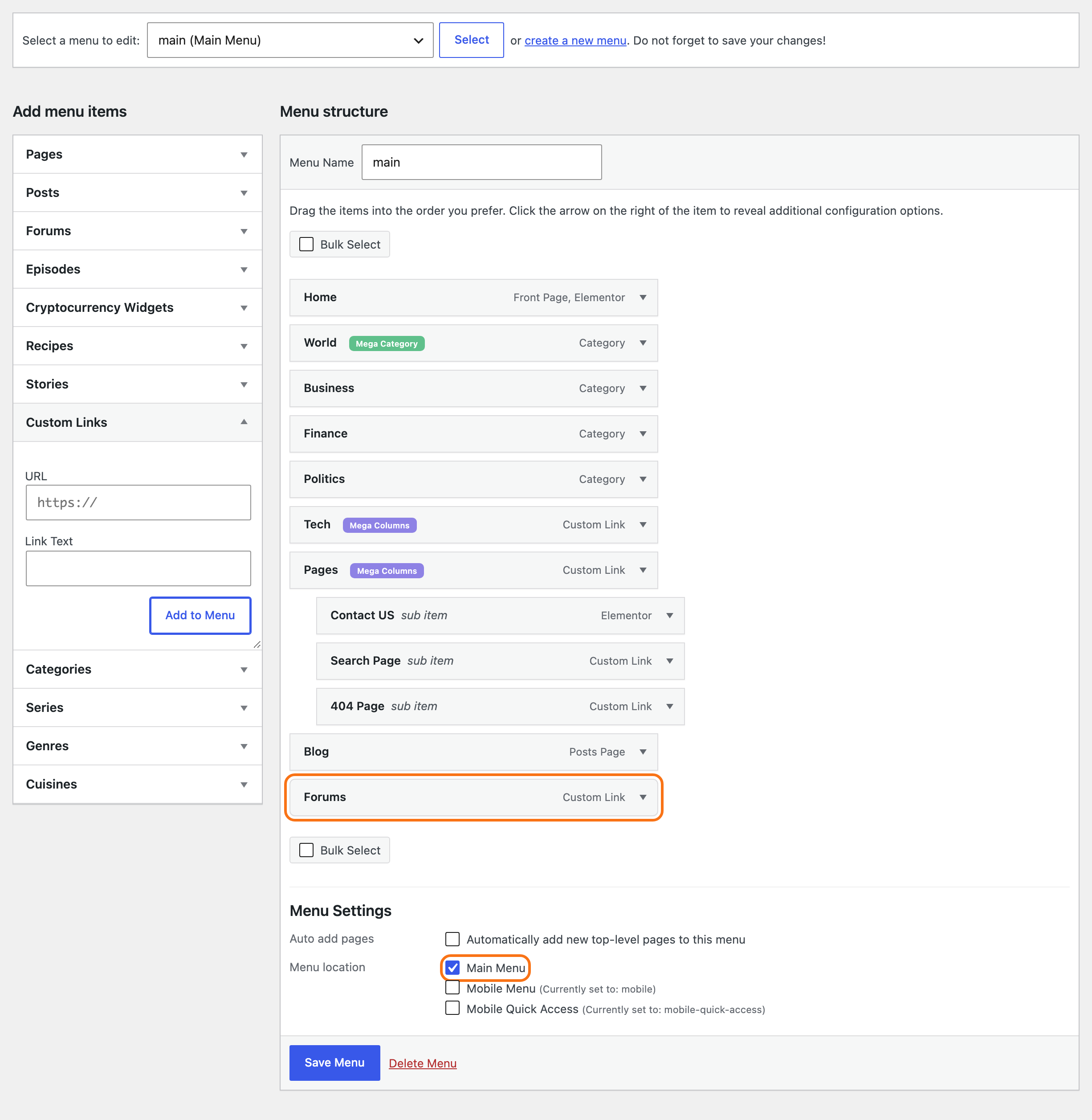
Go to Appearance > Menus and pick your main menu.
-
Open Custom Links. Type your forums address, such as
https://yoursite.com/forums/, in URL, andForumsin Link Text. -
Click Add to Menu, drag the item where you want it, and click Save Menu.
To link one forum rather than the forums page, tick Forums under Screen Options at the top right. A Forums box joins the others; its View All tab lists the forums page first, then each forum.
For more on menus, see How to Create & Setup Header Menus?.
What the forum pages show
Foxiz draws every forum page between your header and footer.
- The forums page has the forum search box, your forums, and the new topic box.
- Each forum, topic and search result has bbPress's breadcrumb at the top, starting from Home and the forums page.
- A sidebar, when you pick one, sits on the right.
Your Theme Options layouts for posts and pages do not reach forum pages. The only forum layout settings are at Foxiz > bbPress Forums.
The search icon in your header does not find forum topics. WordPress leaves forums, topics and replies out of its site search; readers search the forums with the forum search box.
Put the forums on a page of your own
To add text above the forums, or show them on a page with another address, use a page and a bbPress shortcode:
-
Go to Pages > Add Page and give the page a title.
-
Add a Shortcode block and type
[bbp-forum-index]. -
Publish the page and add it to your menu.
![The page Community in the block editor, holding a Shortcode block with [bbp-forum-index]](/docs/assets/images/bbpress-page-shortcode@2x-62b596fa24e761136aa6b16c25f37fd9.png)
The page shows the same forum list, search box and new topic box as the forums page. Two things differ:
- Foxiz shows no page title on it, so put any heading you want in the page itself.
- Its sidebar is Page Shortcode Sidebar at Foxiz > bbPress Forums > Sidebars, which starts on Disable.
A page whose slug, the last word of its address, is forums replaces the forums page itself: its content shows at /forums/. bbPress suggests this on its settings screen.
Give the page an Elementor template, such as Elementor Canvas, and Foxiz keeps it, so you can build the page in Elementor around the shortcode.
Other shortcodes
| Shortcode | Shows |
|---|---|
[bbp-forum-index] | all your forums |
[bbp-single-forum id=123] | one forum and its topics |
[bbp-topic-index] | the latest topics from every forum |
[bbp-single-topic id=123] | one topic and its replies |
[bbp-topic-form] | the new topic form on its own |
[bbp-topic-tags] | a cloud of topic tags |
[bbp-search-form] | the forum search box |
[bbp-login], [bbp-register], [bbp-lost-pass] | bbPress's login, sign up and lost password forms |
[bbp-stats] | forum counts: members, forums, topics, replies |
The id is the number in the forum's or topic's edit screen address, after post=.
Did this answer your question?