Ensure to Update the Foxiz Core Plugin After Theme Update
To ensure the smooth operation of new features, it is important to update the Foxiz Core plugin after updating the theme. This helps maintain compatibility and improve overall performance.
Foxiz Core updates on the Plugins screen like any other plugin. If you remember an Appearance > Install Plugins screen from older versions, the theme no longer has it.
To update the Foxiz Core plugin, please follow the steps below:
-
After updating the Foxiz theme, navigate to Plugins > Installed Plugins. Dashboard > Updates works too and has the advantage of listing the theme and the plugin together.
-
In this area, you will see the update request for the Foxiz Core plugin.
-
Click on the "Update" button.
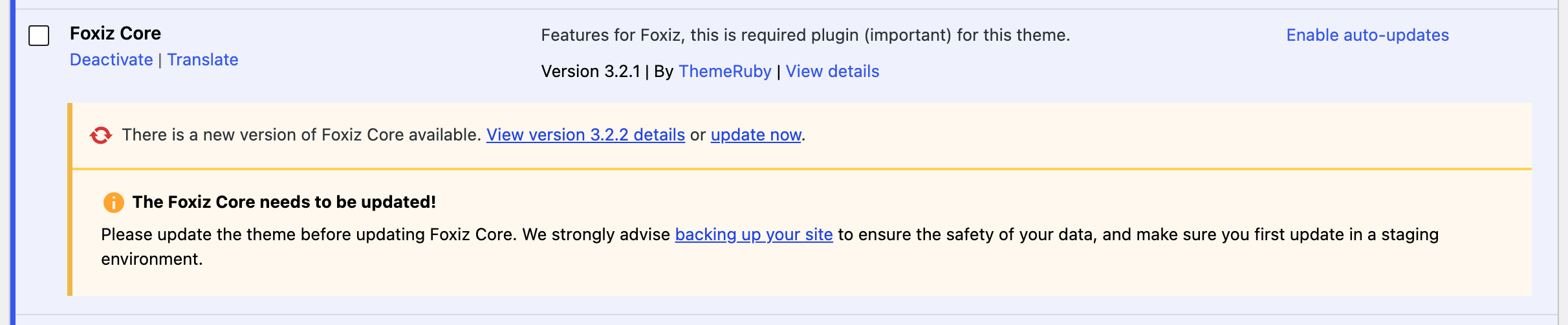
Under the notice, the Foxiz Core row also shows a box titled The Foxiz Core needs to be updated!, asking you to update the theme first, back up your site and try the update on a staging copy. It shows on every Foxiz Core update, so it is not an error. With the theme already updated, go ahead; for a backup, see Backup & Restore Website Data.
On Plugins > Installed Plugins that is the update now link in the Foxiz Core row. On Dashboard > Updates you tick Foxiz Core and press Update Plugins.
If no update is offered at all, check the licence before anything else. The version the plugin compares against comes from the store, requested with your site's token, and a check that comes back empty leaves the row looking perfectly up to date. An expired subscription does exactly this, and says so in its own notice: the front end keeps working while features and updates pause.
With the licence fine, the other cause is the cached answer. Check again. on Dashboard > Updates drops Foxiz's cached update response as well as WordPress's, which a plain page reload does not.
-
After clicking the "Update" button, wait for the plugin to automatically update. Upon successful completion, a notification will appear as shown in the screenshot below.
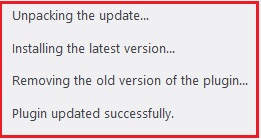
You do not have to regenerate anything afterwards. As soon as the Foxiz Core update finishes, the plugin clears Elementor's generated CSS files itself.
How do I Update the Theme?
Did this answer your question?