Using Child Theme
What is a child theme?
A WordPress child theme is a WordPress theme that inherits its functionality from another WordPress theme, the parent theme. Child themes are often used when you want to customize or tweak an existing WordPress theme without losing the ability to upgrade the parent theme.
Do you need one? If you are setting up Foxiz for the first time, no: install and activate Foxiz itself. You need a child theme only when you plan to edit the theme's code files, the PHP or CSS inside the theme folder. Your settings are safe either way, as explained below.
The Foxiz child theme comes in the full package rather than as a separate purchase or download. Download the full package from the Downloads tab of your account at https://store.foxiz.io/, unzip it, and the child theme archive is in there beside foxiz.zip.
You can install the Child theme in the same way you have installed the main theme. Install Foxiz itself first: WordPress refuses a child theme whose parent is not there, and says so, "The parent theme could not be found." Then you can add your custom code directly to Child Theme files to make changes appear on your site. These changes won't be overwritten during updates.
There are no disadvantages of not using a Child Theme if you have no plans to modify or customize the parent theme.
What a child theme protects is your edits to theme files. It is not what protects your settings: everything you set in Theme Options is stored in the database, in the foxiz_theme_options record, and a theme update never touches it. A child theme is worth the trouble when you are editing PHP or CSS in the theme folder, and not otherwise.
Running one changes nothing about how Foxiz behaves. Foxiz Core identifies the theme with get_template(), which returns the parent slug, so the Foxiz menu, the Elementor widgets (the Foxiz blocks for the Elementor page builder) and the licence check all keep working. Automatic updates are registered against the parent slug foxiz too, so the parent still updates itself while your child theme stays as you left it.
A function you copy from Foxiz into your child theme replaces the parent's version, and it does not change when Foxiz updates.
The one this catches is foxiz_register_script_frontend() in the parent's functions.php. It loads the scripts for Summarize with AI, Auto Load Next Posts, live blog updates, the AdBlock detector and the WooCommerce buttons, so an old copy in your child theme leaves those features without their scripts. If your child theme overrides it, copy the current version from the parent's functions.php after each Foxiz update and reapply your change.
You can refer to the URL below for further information: https://www.wpbeginner.com/beginners-guide/wordpress-child-theme-pros-cons/
Customizing CSS via a child theme
For most sites, custom CSS belongs in Appearance > Customize > Additional CSS, which a Foxiz update never touches and which needs no child theme: see How to Add Custom CSS. The child theme's style.css is for those already running a child theme for other code.
After you activate the child theme, add your custom CSS:
-
Go to Appearance > Theme File Editor. The screen was called Theme Editor before WordPress 5.9 renamed it, and it sits at the bottom of the Appearance menu.
-
Select "Foxiz Child" at the "Select theme to edit:" option. Only the theme you are editing is opened here, so if the dropdown offers Foxiz and not Foxiz Child, the child theme is not activated yet.
-
Select
style.cssin the Theme Files list on the right, add your code, and click Update File.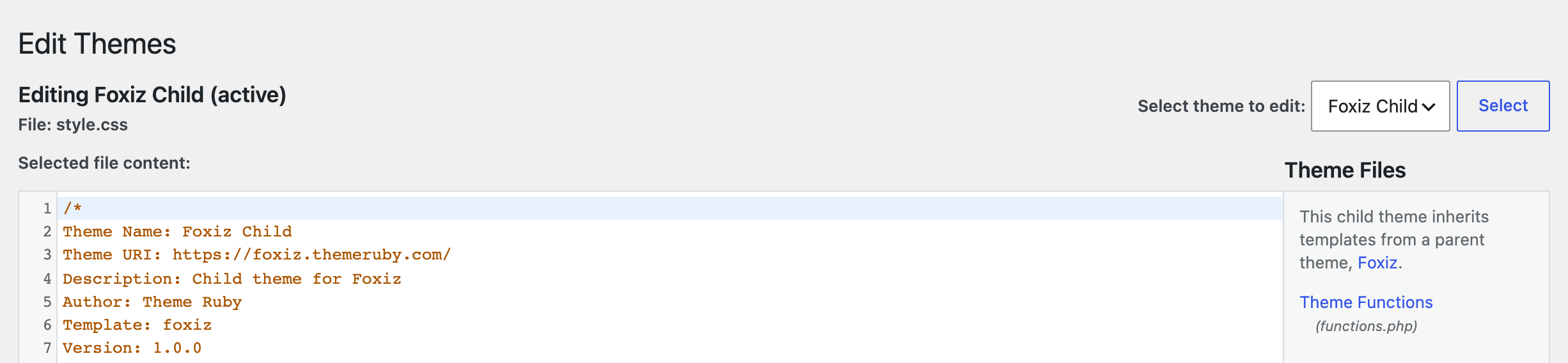
If Theme File Editor is not in the Appearance menu at all, the file editors have been switched off for the whole site, usually by DISALLOW_FILE_EDIT in wp-config.php or by the host. Many managed hosts set it by default. Edit style.css over FTP or through your host's file manager instead; the file and the result are the same.
Did this answer your question?