How to Edit a Post with AI
On a post that already has text, the Write tab is a chat about that post. Ask for what you want changed, in your own words, and each answer comes back as a card that shows the change before anything touches the post.
For one paragraph there is a quicker way: Rewrite with AI on the block toolbar, further down.
Ask for a change in the chat
-
Open the post and click Write with AI in the Foxiz AI box.
-
Type what you want in Ask anything, or say what to change, then click the send arrow. Ask the way you would ask an editor:
- "Make the intro shorter and friendlier."
- "Give me five more title options, under 60 characters."
- "Add a section on watering, after the light section."
- "Write an excerpt and a tagline." The tagline is the subtitle Foxiz shows under the post title.
- "Is anything in this post out of date?" A question gets an answer, not an edit.
-
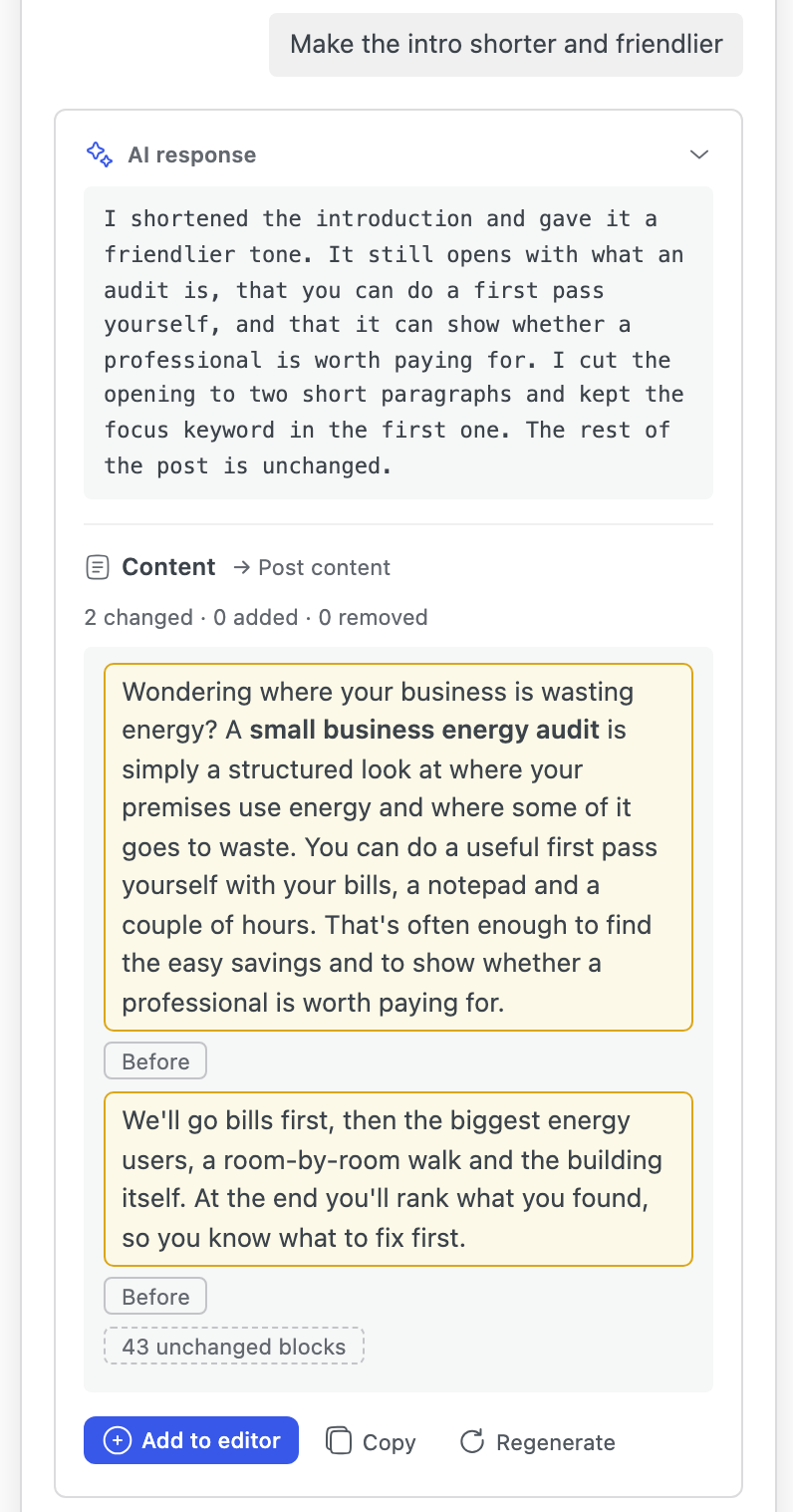
Read the card.
- A change to the content is shown block by block, marked Changed:, Added: or Removed:, with a count such as "2 changed · 0 added · 0 removed". Before opens the old version of a changed block, and the blocks the answer leaves alone are folded into one line, such as "43 unchanged blocks".
- A title, excerpt, tagline, meta description, tags or categories shows the new text and the field it goes to.
-
Decide:
- Add to editor, or Add all to editor when the answer has several parts, writes it into the post.
- Add one part adds only the part you pick, say the excerpt but not the tagline.
- Undo takes back what you just added.
- Regenerate asks again for a different answer.
- Not quite right? Reply in the box instead: "Good, but keep the second sentence." The assistant remembers the chat.
Nothing is saved until you save the post.
Point the request at chosen parts
A request like "make it better" could touch anything. To keep the answer to certain parts of the post, click the ⋯ button beside the box (Choose parts of the post) and a row of parts opens above the box. Click the ones you want; each becomes a chip on your request.
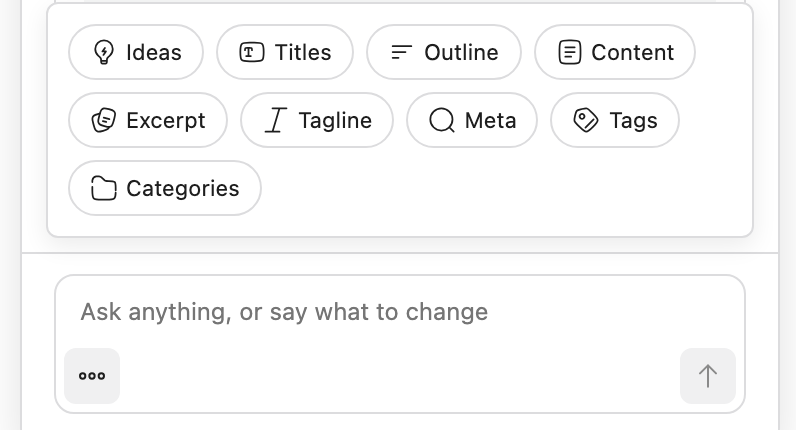
The row lists every part of a post, from Ideas and Titles to Tags and Categories. Only the tasks switched on under Tasks, in the Editor Features section of Foxiz > AI Assistant, are listed. With a chip set you can even leave the box empty: Excerpt alone asks for an excerpt.
When an answer cannot be added
The assistant guards your post. An answer that would break it is shown, but its Add is replaced by a reason:
| The card says | What to do |
|---|---|
| The answer lost, repeated or rewrote an image or block of your post | Regenerate |
| The answer changed a shortcode of your post | Regenerate |
| The content came back incomplete | Regenerate |
| The post changed: some images or blocks this answer refers to are gone | You edited the post meanwhile. Regenerate |
| This post is too long for whole-post edits | Ask about one part, or rewrite paragraph by paragraph from the block toolbar |
A request that stops halfway offers Retry, or Continue when the answer was cut off and can carry on. Get the prompt instead turns it into a prompt you can finish in a web AI chat.
Rewrite one paragraph from the block toolbar
-
In the block editor, click a paragraph. To rewrite only part of it, select those words.
-
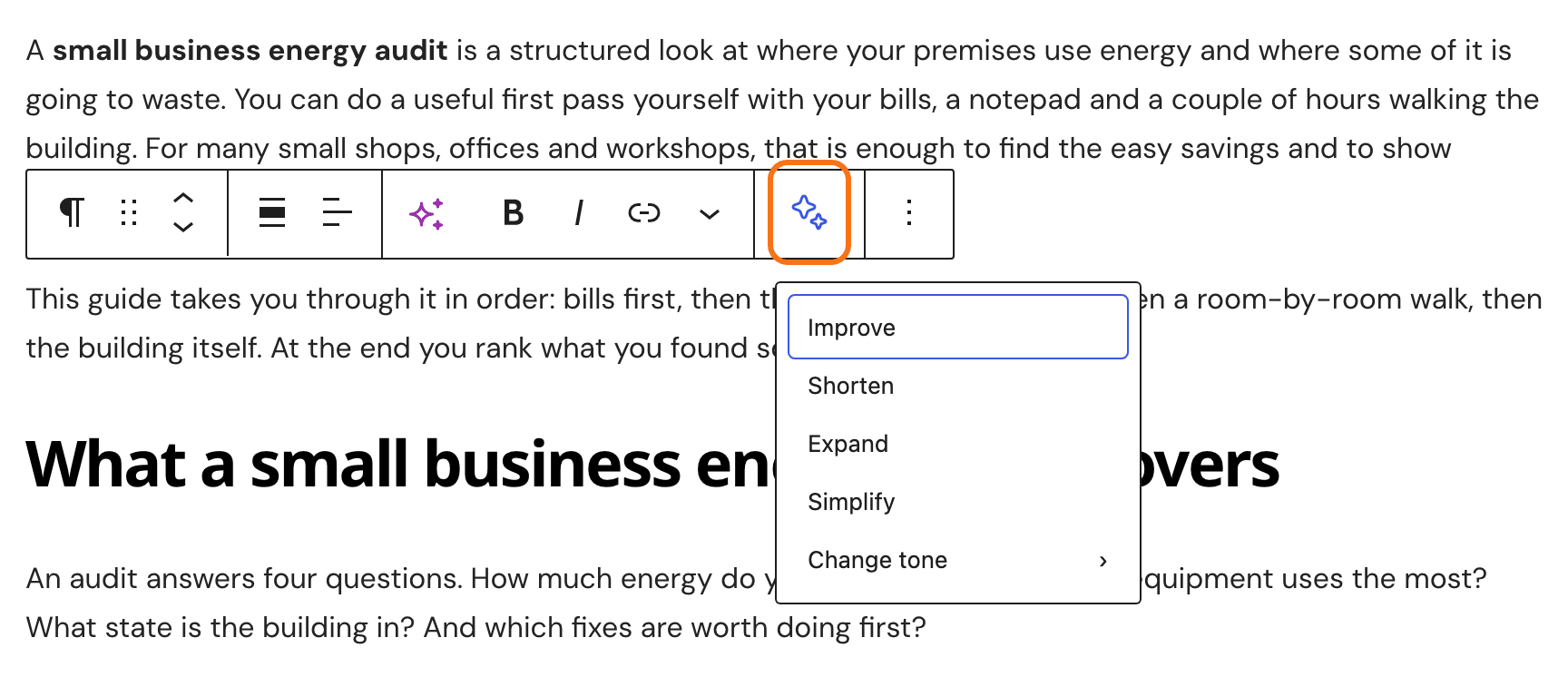
Click Rewrite with AI on the block toolbar, the sparkle button after the More arrow, and choose. With Elementor active, do not confuse it with Elementor's own AI button, which sits left of Bold:
- Improve: better wording and flow.
- Shorten: clearly shorter, keeping the main point.
- Expand: adds reasoning or an example taken from the post.
- Simplify: simpler words and shorter sentences.
- Change tone: pick a tone from the list. Your Default Tone is marked default.
-
The Foxiz AI Assistant window opens with the rewrite as a card. Click Add to editor to keep it.
The button needs a connected provider, the block editor and the Rewrite paragraph (block toolbar) task. When it cannot help, its menu says why:
- "Write something first." The paragraph is empty.
- "This paragraph is too long for the AI…" Split it into shorter paragraphs first.
- "This paragraph has formatting the AI cannot keep…" It has colours, highlights, footnotes or images, or sits inside another block. Edit it by hand.
- "An answer is still on its way in the AI panel." Wait for it, or press Stop in the window.
Start a new chat
The chat keeps a running summary of what you asked, so the assistant remembers your earlier requests. When you move on to something unrelated, click New chat in the window header: answers stay focused and each request costs fewer tokens, the pieces of text your provider bills by.
The chat belongs to this post and this browser tab. Close the tab and the chat is gone; the post keeps everything you added.
Did this answer your question?