Writing Style
Short rules the AI follows on every task, so the writing sounds like your site. They guide the writing without dictating it, and a writer's request in the editor always wins.
Where: Foxiz > AI Assistant > Writing Style, under Writing Profile.
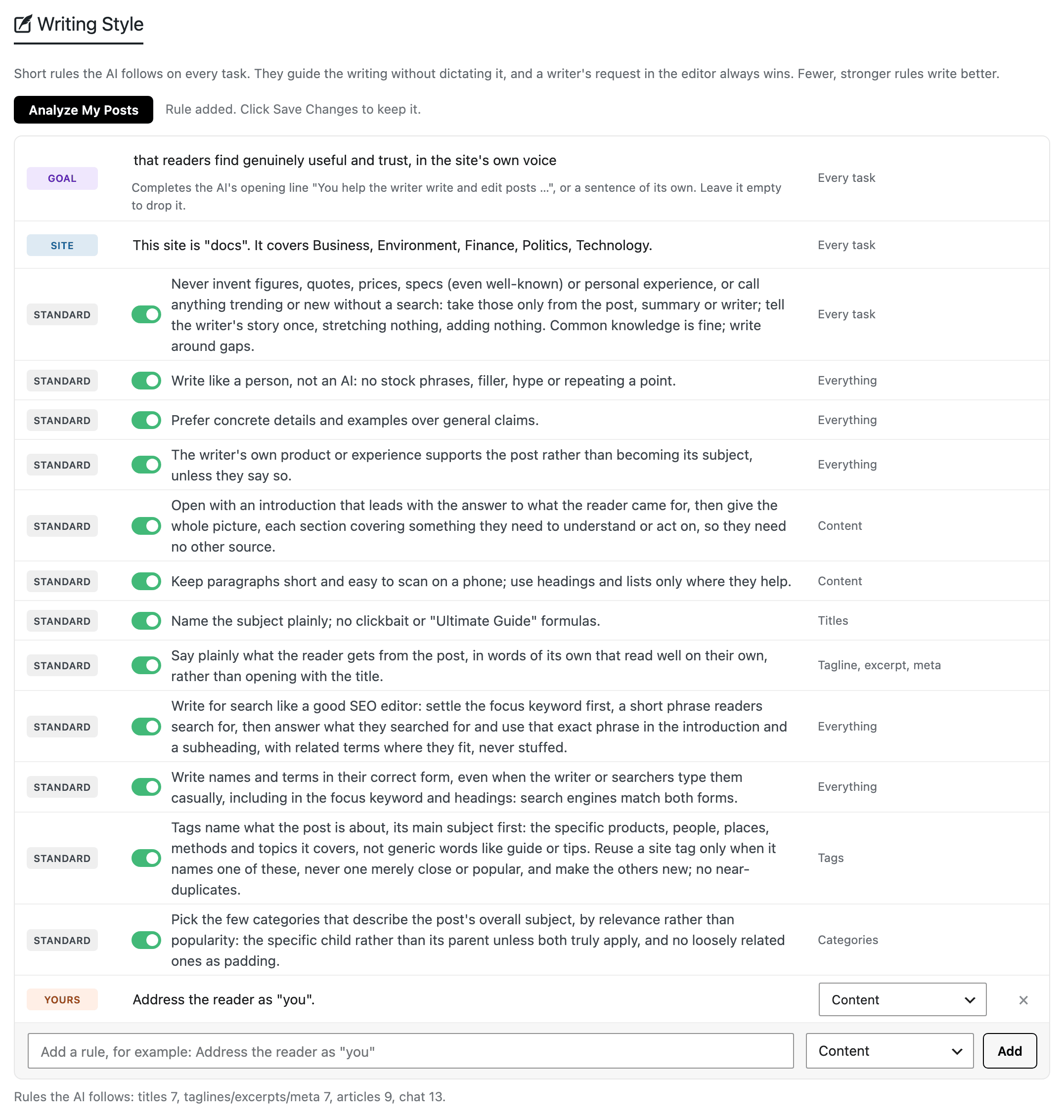
Every change in this section, an analysis included, is kept only when you click Save Changes.
Analyze My Posts
Analyze My Posts reads a few of your published posts and adds rules that describe your style.
- Which posts: up to eight of your newest published posts of 300 words or more, from the post types ticked in Post Types under Editor Features. Password protected posts are skipped.
- It needs at least two such posts. With fewer, it asks you to publish more first.
- Rules found in fewer than eight posts are less reliable. Read them before you save.
- What it adds: three to five Learned rules, habits most of the posts share. It also rewrites the Site row.
- Running it again: the new Learned rules replace the old ones. Standard rules and yours stay.
- Edit a Learned rule and it becomes yours, so the next analysis keeps it.
- When no habit is shared by most posts, nothing is added and your rules stay as they are.
How it runs depends on the connection:
- With a provider connected: it takes about half a minute, then the rules appear in the list.
- In Prompt mode: it shows a prompt instead.
- Click Copy Prompt and run it in any AI chat.
- Paste the answer into the box under it, one rule per line.
- Click Use These Rules.
- When the provider fails or this month's token limit is used up: it falls back to the prompt.
The rule list
Each row is one rule. Its badge names its kind, one of the five below, and the end of the row says what it applies to.
Goal
What every post should achieve. The AI reads it as the end of the sentence "You help the writer write and edit posts …". Default: "that readers find genuinely useful and trust, in the site's own voice".
- Start with a small letter to finish that sentence. Start with a capital to write a sentence of its own.
- Leave it empty to drop it.
- Up to 300 characters. Applies to every task.
Site
One sentence on what your site is. Every task reads it. Default: built from your site title, tagline and up to five main categories, such as: This site is "docs". It covers Business, Environment, Finance, Politics, Technology.
- You can edit it, but not delete it or leave it empty.
- Analyze My Posts rewrites it from your posts.
Standard
Twelve general rules come with the theme, all on by default. Read them on the page and switch off any you disagree with.
They keep the AI from inventing figures, quotes or prices, keep the writing natural and concrete, and cover titles, taglines, search, tags and categories.
The first one, against invented figures and quotes, applies to Every task, tag and category suggestions included. Each of the others applies to one of the choices listed under Adding a rule, such as Content or Titles.
Learned
Rules Analyze My Posts found in your posts. Edit one and its badge turns to Yours. Delete one with the × at the end of its row.
Yours
Rules you add yourself. You can edit the text, change what it applies to, or delete it with the ×.
Adding a rule
The row at the bottom of the list adds one:
- Type the rule, for example: Address the reader as "you".
- Pick what it applies to.
- Click Add, or press Enter.
- Click Save Changes.
The choices for what a rule applies to:
- Everything: titles, taglines, excerpts, meta descriptions, articles and the chat. Not tags or categories.
- Titles.
- Tagline, excerpt, meta: the tagline, the excerpt and the meta description.
- Content: the article.
- Tags: tag suggestions read only these rules.
- Categories: category suggestions read only these rules.
Limits on a rule:
- Up to 300 characters. A longer one, such as a long Learned rule, is marked, and the form will not save until you shorten it.
- Up to 30 rows, the Site row included. Standard rules do not count. When the list is full, delete a rule first.
- A rule already in the list is refused. If it matches a Standard rule you switched off, switch that one back on instead.
How many rules is too many
Fewer, stronger rules write better. The Standard rules plus a few of your own work best.
The line under the list counts the rules each kind of request receives, and warns you:
- More than 15 for one kind: the writing may turn formulaic.
- More than 25: so many rules make the writing stiff, as weak as having none. Keep only the ones that matter most.
- None at all: the AI writes with your Writing Profile only. Switching the Standard rules back on usually makes the writing better.
Related
- How to Teach the AI Your Writing Style: teaching the assistant your style, step by step.
- Writing Profile: tone, language and heading capitalisation, which are settings rather than rules.
Did this answer your question?