Editor Features
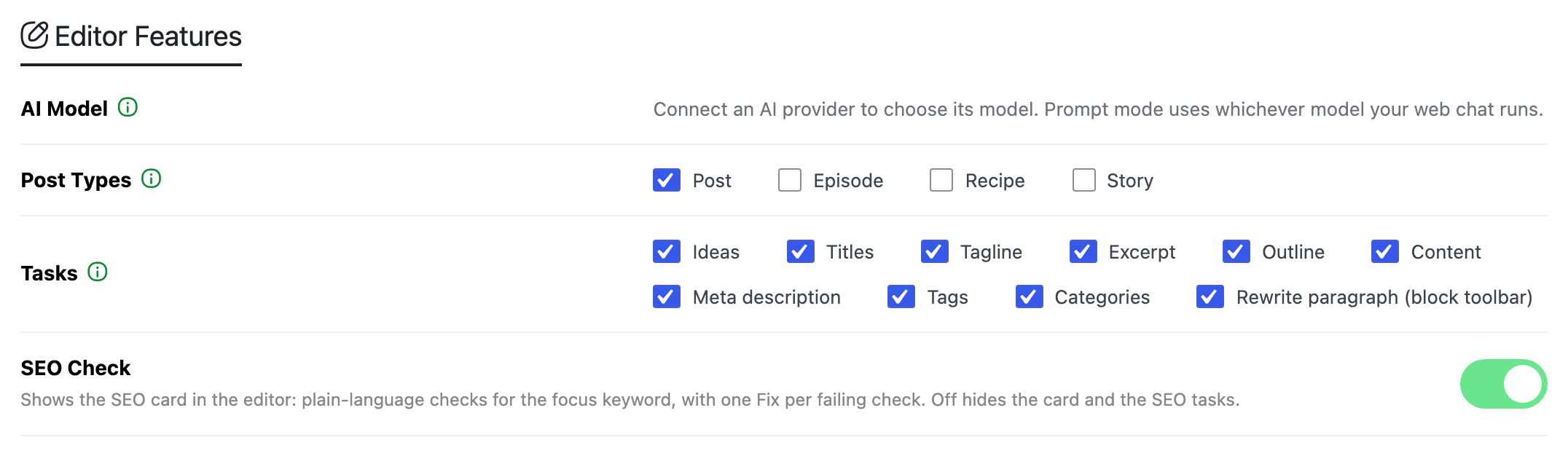
Choose what your writers get in the post editor: which AI model answers, which post types get the assistant, which quick tasks it shows, and the SEO check. Trim the tasks to the ones your team uses and the editor stays simple.
Where: Foxiz > AI Assistant > Editor Features, under Writing Style.
AI Model
The model your provider uses to answer. Default: Auto (newest). It uses the newest model your provider offers, and follows new releases.
- Pick a model to fix it, for example the strongest one when quality matters more than cost. Each model is listed with its provider.
- Load models fetches your provider's current list, so new models show up.
- If your provider stopped offering the model you picked, it shows as "(not offered any more)" and Load models switches the list to Auto (newest). Click Save Changes to keep that.
- After the first answer, a note says which model answered last. If that is not the model you picked, your account may not have it, so another one answered.
- The reader summaries of Summarize with AI in Connector API Mode use this model too.
The list only appears once a provider is connected. Until then a note stands in its place: Prompt mode uses whichever model your web chat runs.
Post Types
The post types whose edit screen shows the Foxiz AI box. Default: only Post.
- The list offers Post, the podcast Episode when Support Podcast is on in Theme Options > Ruby Podcast, and the other public post types on your site, such as Recipe or Story from their plugins.
- Pages are never offered.
- Analyze My Posts under Writing Style reads posts of the ticked types.
Tasks
The quick tasks the editor offers. All are on by default. Untick the ones your team does not use, and they leave the editor.
- Short text: Ideas, Titles, Tagline, Excerpt and Meta description.
- The article: Outline and Content.
- Tags and Categories.
- Rewrite paragraph (block toolbar): the Rewrite button on a block's toolbar. It needs the block editor and a connected provider; it does not show in Prompt mode or the Classic editor.
A task you untick also leaves the chat. With Titles off, for example, a chat answer no longer suggests a title. The chat itself stays available even when every task is off.
SEO Check
Shows the SEO card in the editor: plain language checks for the focus keyword, with one Fix per failing check. On by default. Off hides the card and the SEO tasks: the focus keyword suggestions and the fixes.
Click Save Changes to keep your changes.
Related
- How to Write a New Post with AI: writing a post with these tasks.
- How to Edit a Post with AI: the block toolbar Rewrite.
- How to Finish a Post with the Checklist: the SEO card.
- Access & Limits: who sees the Foxiz AI box, beyond the post types set here.
Did this answer your question?