How to Enable the Horizontal Scrolling Mode on The Mobile and Tablet?
Foxiz supports the horizontal scrolling mode for all grid blocks. It lets your visitors swipe sideways to see the posts, which cuts down the scrolling they need to reach the content they want.

Twenty one blocks carry it, which is every grid including Foxiz - Grid Products, the four overlay blocks, Foxiz - Flex List, Foxiz - Personalized List and Foxiz - Taxonomies List 1 through Foxiz - Taxonomies List 5.
Turn on horizontal scrolling for a block
To get started, follow the steps below:
-
Select the grid block you want to change.
-
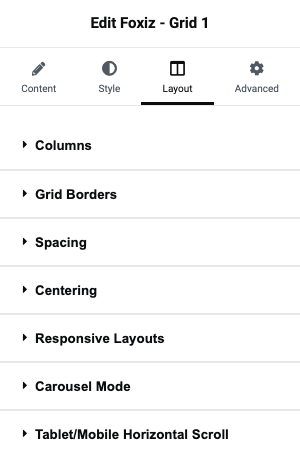
Select the Layout tab.
-
Click to open the "Tablet/Mobile Horizontal Scroll" pane.
It is the last section on the tab, below Carousel Mode.
-
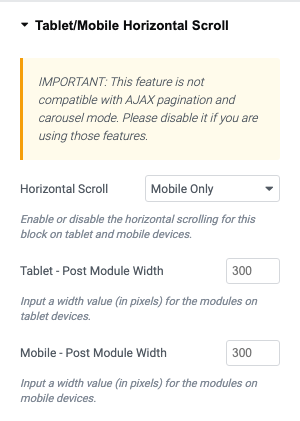
Turn it on and set the width for tablet and mobile.
The switch is Horizontal Scroll and it offers four choices rather than two: - Disable - (the default), Tablet & Mobile, Tablet Only and Mobile Only. So you can swipe on phones and keep a normal grid on tablets.
The two width fields are Tablet - Post Module Width and Mobile - Post Module Width, and both take a number of pixels.
Both show 300 as a hint, and that hint is not what happens if you leave them blank. Empty means the theme's own fallback, which is a percentage of the row rather than a pixel width: 40% on tablet and 70% on mobile. The 70% is deliberate, because a slice of the next post peeking in at the edge is what tells a visitor the row can be swiped.
Features it does not work with
Please note: this feature does not work with AJAX pagination on the same block.
Carousel mode is the other one. A block cannot be a carousel and a horizontal scroller at the same time, and the panel says both in the warning above the switch. Nothing stops you turning both on; the result is simply not what you want.
Did this answer your question?