How to Set Background Color for a Elementor Section?
If you would like a gray or coloured background on an Elementor section, keep dark mode in mind (Foxiz lets readers switch the site to dark: How to Enable Dark Mode Feature). Elementor's own Background colour is the same in both modes, so a solid colour may cause layout issues in dark mode.
Instead, we recommend a color with alpha channel (opacity color). For example: #00000010
There are two ways round it. For most sites, use the translucent colour below: one value that works in both modes. If you want a different colour in dark mode, Foxiz adds a Foxiz Dark Mode - Background section to the Style tab of every section, container and column, right after Background; the colour you set there is used only when the site is dark.
#00000010 is a hexadecimal color: #000000 is black, and 10, the two digits at the end, is the opacity value. Those two digits are hexadecimal too, from 00 (fully clear) to FF (solid), so 10 is about 6 per cent, a very light tint, and 20 about 12 per cent. If counting in hex is not for you, use the opacity slider in the colour picker instead (see the note below the steps).
A translucent colour works in both schemes because it darkens or lightens whatever is behind it rather than replacing it. The theme does exactly this for its own subtle greys: the variable behind most Foxiz dividers and panel backgrounds is #88888826 in light mode and #88888840 in dark.
To get started, please follow the steps below:
-
Open the page with Edit with Elementor, then click the section you would like to edit.
On a site built with Elementor containers rather than sections, select the container. The Background section is the same on both.
-
Select the Style tab > Background > Color, then enter the value you want.
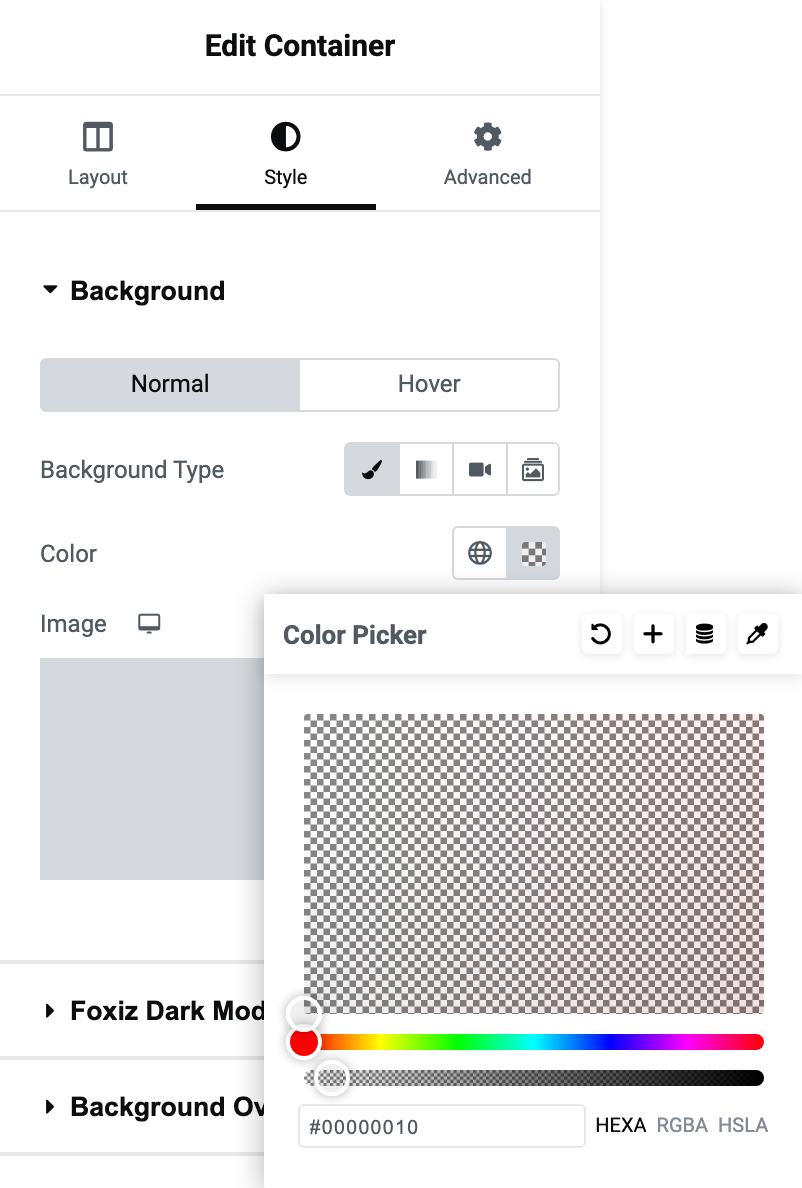
Color does not appear until you have chosen a background type. The row of icons at the top of the section is Classic, Gradient, Video and Slideshow; Classic is the one that reveals the colour field.
The Background section also has Normal and Hover tabs. The colour you set here is the Normal one.
You can also use the opacity slider in the colour picker to change how strong the colour is.
If the background you pick is dark enough that the post titles stop being readable, the fix is on the Foxiz block rather than on the section. Most post blocks have a Text Color Scheme section on their own Style tab, holding one dropdown of the same name with two choices: Default (Dark Text) and Light Text. Their default is Default (Dark Text).
The overlay blocks, Foxiz - Overlay, Foxiz - Highlight Overlay, Foxiz - Flex Overlay and Foxiz - Personalized Overlay, print their text over the image, so they work the other way round. Their Text Color Scheme is on the Layout tab under Overlay Content, and the choices are Light Text and Dark Text. Their default is Light Text.
Did this answer your question?